

CC 4.0 License
The content of this section is derived from the content of the following links and is subject to the CC BY 4.0 license.
The following contents can be assumed to be the result of modifications and deletions based on the original contents if not specifically stated.
Code splitting
Rspack supports code splitting, letting you divide your code into separate chunks. You have full control over the size and number of generated assets to improve loading performance.
Here, a Chunk refers to a resource that a browser needs to load.
Dynamic import
Rspack uses the import() syntax that conforms to the ECMAScript proposal for dynamic imports.
In index.js, we dynamically import two modules through import(), separating them into a new chunk.
Building this project produces three chunks: src_bar_js.js, src_foo_js.js, and main.js. Inspecting them shows that shared.js exists in both src_bar_js.js and src_foo_js.js. We will cover how to remove duplicated modules later.
Refer to Module methods - Dynamic import() for the detailed dynamic import API, as well as how to use dynamic expressions and magic comments in dynamic import.
Although shared.js exists in two chunks, it is executed only once, so you don't have to worry about multiple instances.
Entry point
This is the simplest and most intuitive way to split the code, but it requires manual configuration. Let's start by looking at how to create multiple Chunks from multiple entry points.
This will yield the following build result:
Similarly, examining the output shows that they all include the repeated shared.js.
SplitChunksPlugin
The splitting approach above is intuitive, but most modern browsers support concurrent network requests. If we split a single-page application into one chunk per page, the browser still has to fetch a large chunk when users switch pages, which wastes that concurrency. Instead, we can break the chunk into smaller ones and request those smaller chunks at the same time to use the browser's network capacity more effectively.
Rspack defaults to splitting files in the node_modules directory and duplicate modules, extracting these modules from their original Chunk into a separate new Chunk. Why does shared.js still appear repeatedly in our example above? The shared.js file here is very small, and splitting such a small module into its own Chunk can actually slow down loading.
We can configure the minimum split size to 0 to allow shared.js to be extracted on its own.
After rebuilding, you will find that shared.js has been extracted separately, and there is an additional Chunk in the output that contains only shared.js.
Force the splitting of certain modules
We can specify certain modules to be forcibly grouped into a single Chunk, for example, the following configuration:
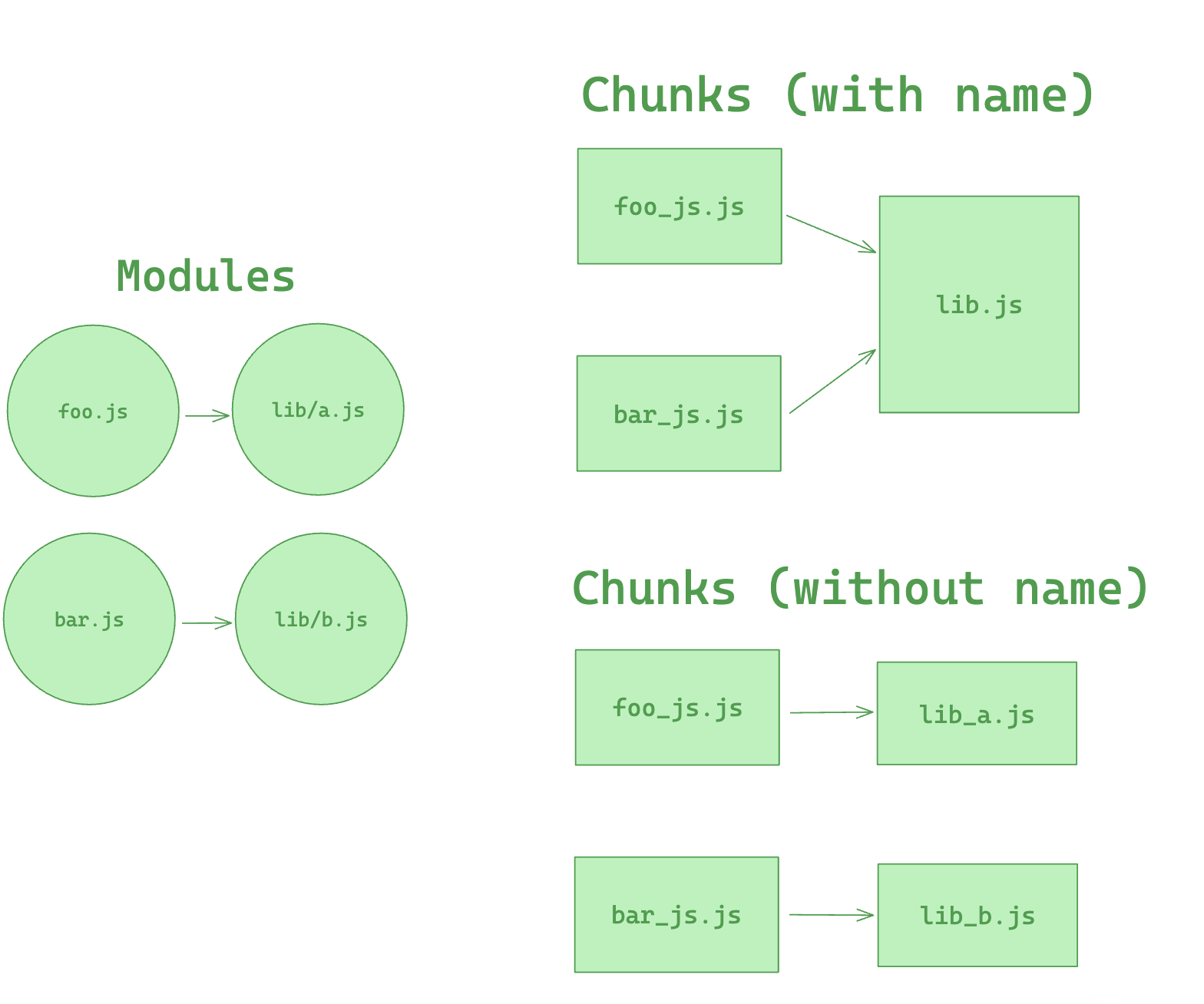
With the above configuration, all files that include the some-lib directory in their path can be extracted into a single Chunk named lib. If the modules in some-lib are rarely changed, this Chunk will consistently hit the user's browser cache, thus a well-considered configuration like this can increase the cache hit rate.
However, separating some-lib into an independent Chunk can also have downsides. Suppose a Chunk only depends on a very small file within some-lib, but since all files of some-lib are split into a single Chunk, this Chunk has to rely on the entire some-lib Chunk, resulting in a larger load volume. Therefore, when using cacheGroups.{cacheGroup}.name, careful consideration is needed.
Here is an example showing the effect of the name configuration of cacheGroup.
Prefetching/Preloading modules
Adding these inline directives to your imports allows Rspack to output resource hints that tell the browser that:
- prefetch: resource is probably needed for some navigation in the future
- preload: resource will also be needed during the current navigation
An example of this is having a HomePage component, which renders a LoginButton component which then on demand loads a LoginModal component after being clicked.
This will result in <link rel="prefetch" href="login-modal-chunk.js"> being appended in the head of the page, which will instruct the browser to prefetch in idle time the login-modal-chunk.js file.
Rspack will add the prefetch hint once the parent chunk has been loaded.
Preload directive has a bunch of differences compared to prefetch:
- A preloaded chunk starts loading in parallel to the parent chunk. A prefetched chunk starts after the parent chunk finishes loading.
- A preloaded chunk has medium priority and is instantly downloaded. A prefetched chunk is downloaded while the browser is idle.
- A preloaded chunk should be instantly requested by the parent chunk. A prefetched chunk can be used anytime in the future.
- Browser support is different.
An example of this can be having a Component which always depends on a big library that should be in a separate chunk.
Let's imagine a component ChartComponent which needs a huge ChartingLibrary. It displays a LoadingIndicator when rendered and instantly does an on demand import of ChartingLibrary:
When a page which uses the ChartComponent is requested, the charting-library-chunk is also requested via <link rel="preload">. Assuming the page-chunk is smaller and finishes faster, the page will be displayed with a LoadingIndicator, until the already requested charting-library-chunk finishes. This will give a little load time boost since it only needs one round-trip instead of two. Especially in high-latency environments.
Using webpackPreload incorrectly can actually hurt performance, so be careful when using it.
Sometimes you need to have your own control over preload. For example, preload of any dynamic import can be done via async script. This can be useful in case of streaming server side rendering.
If the script loading will fail before Rspack starts loading of that script by itself (Rspack creates a script tag to load its code, if that script is not on a page), that catch handler won't start till chunkLoadTimeout is not passed. This behavior can be unexpected. But it's explainable — Rspack can not throw any error, cause Rspack doesn't know, that script failed. Rspack will add onerror handler to the script right after the error has happen.
To prevent such problem you can add your own onerror handler, which removes the script in case of any error:
In that case, errored script will be removed. Rspack will create its own script and any error will be processed without any timeouts.